| Importing Clients' Information |
|
Before importing your clients into Clear Biz, you must export your clients' information first
from one of the software packages listed on the left side of the menu. |
|
| Follow the instructions below on how to export your clients' information into a text/CSV file. |
|
|
|
| Exporting Clients From Lacerte |
|
| STEP 1 |
|
 |
|
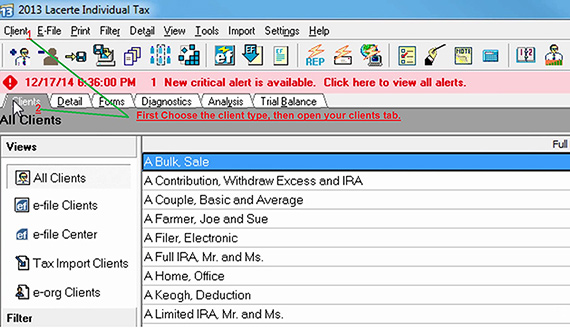
| From the main menu in Lacerte, go to Client > . |
|
| STEP 2 |
|
 |
|
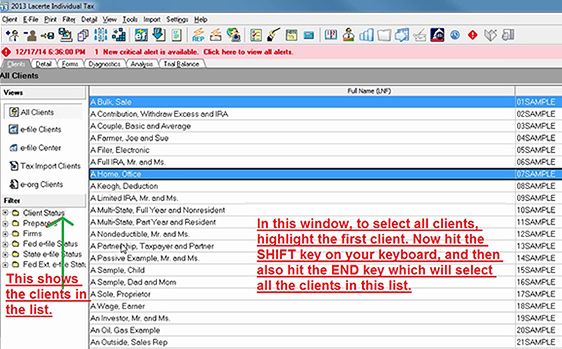
| Select a client folder from left sidebar and select which clients to export from list. |
|
| STEP 3 |
|
 |
|
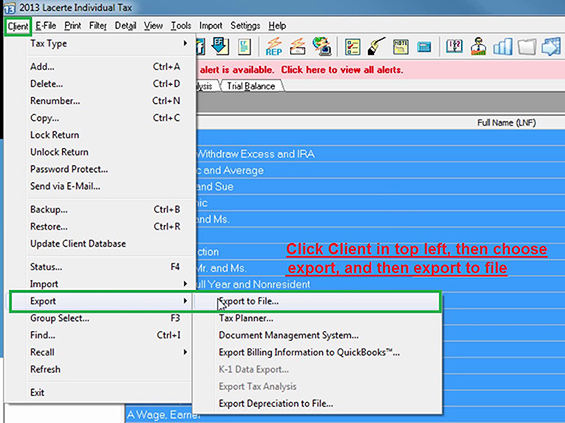
| From the main menu, go to Client > > . |
|
| STEP 4 |
|
 |
|
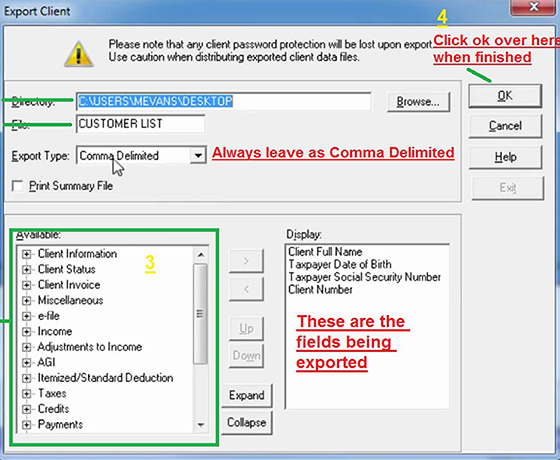
| 1) Choose destination to save export file to and name the file. |
|
2) Export as Comma Delimited (csv) and select which fields under the 'Available' category to
export into the display area. (see above) |
|
| 3) Click to export file. |
|
| STEP 5 |
|
| After export has been finished, click the link below to import file into Clear Biz. |
|
| > To import text/CSV file into Clear Biz, click here. |